WiFi Explorer Pro 3.9.3 for MacOS Download

Reliable wireless connectivity is essential in today’s digital environment. Whether you’re working from home, managing an enterprise network, or simply streaming media, a stable and optimized Wi-Fi connection is critical for performance. However, diagnosing wireless problems can be complex without the right tools. This is where WiFi Explorer Pro for macOS 3.9.3 proves invaluable.
WiFi Explorer Pro takes the WiFi Explorer codebase and adds a suite of features that make it the ideal tool for wireless networking and IT professionals. You can use WiFi Explorer Pro for preliminary assessments, to help design and validate wireless network installations, and to identify channel conflicts, overlaps, poor signal quality, and other issues that may be affecting the connectivity or performance of your home, office, or enterprise wireless network.
Developed by Intuitibits LLC, WiFi Explorer Pro is an advanced wireless network analysis tool designed specifically for macOS. It provides in-depth analysis of Wi-Fi environments, enabling users to identify signal interference, channel congestion, security configurations, and performance bottlenecks.
Key Features of WiFi Explorer Pro for macOS 3.9.3
WiFi Explorer Pro is designed for professionals and advanced users who require more sophisticated Wi-Fi scanning tools. However, its intuitive interface also makes it accessible to everyday users.
- Passive and targeted scanning modes
- Spectrum analysis integration
- Custom filters
Comprehensive Wi-Fi Network Scan
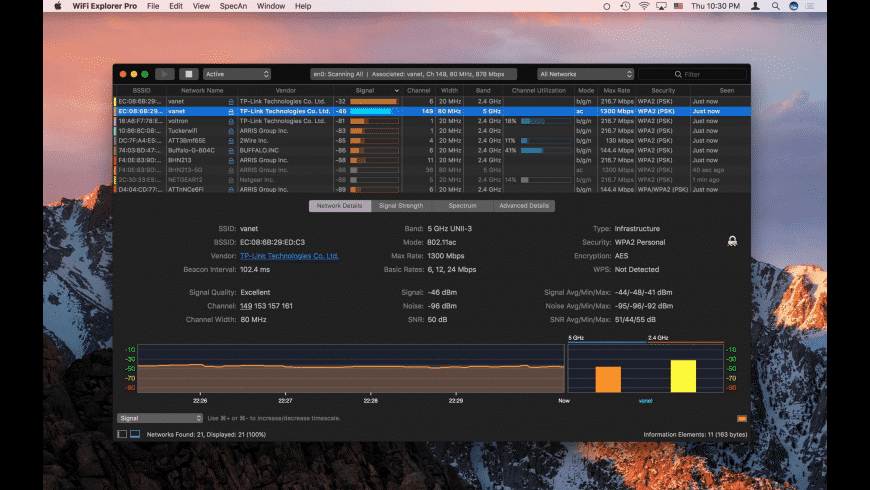
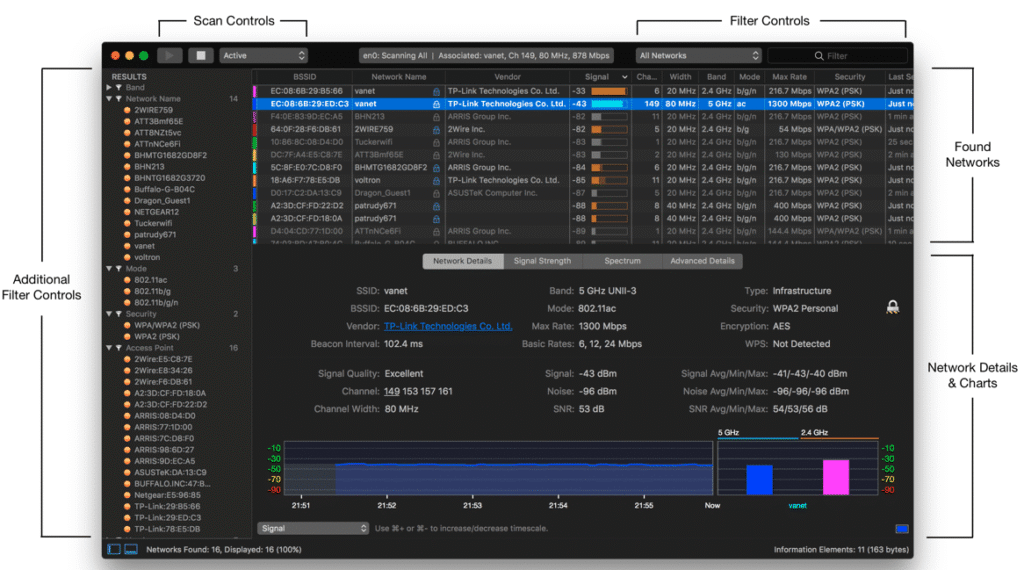
One of the main advantages of WiFi Explorer Pro is its ability to scan and display detailed information about nearby wireless networks. It provides data such as:
- SSID (Network Name)
- BSSID (Access Point Identifier)
- Signal Strength (RSSI)
- Channel Number and Width
- Security Type (WPA2, WPA3, etc.)
- PHY Mode and Supported Data Rates
With this detailed overview, users can quickly assess the wireless environment and identify congestion or interference issues.
Advanced Channel Analysis
- Channel overlap is one of the most common causes of Wi-Fi performance problems. WiFi Explorer Pro 3.9.3 offers visual channel graphs for both the 2.4 GHz and 5 GHz bands.
- These graphs allow users to:
- Detect overlapping channels
- Identify optimal channels for router configuration
- Reduce signal interference
- Improve network stability
By selecting less congested channels, users can significantly increase their network speed and reliability.
Real-time monitoring
The software provides real-time updates on signal strength and network changes. This feature is especially useful for:
- Testing router placement
- Adjusting antennas
- Evaluating signal coverage in different rooms
Because the data is continuously updated, users can instantly see the impact of physical adjustments.
Customizable columns and filters
WiFi Explorer Pro allows you to customize the displayed information. You can add, remove, or rearrange columns according to your analysis needs.
In addition, powerful filtering tools allow users to:
- Display only specific bands (2.4 GHz, 5 GHz, 6 GHz)
- Filter by security type
- Sort networks by signal strength
- Focus on specific providers or SSIDs
This flexibility makes the tool suitable for both home users and IT professionals.
Detailed Network Information Dashboards
When a network is selected, detailed technical information is displayed, including:
- Beacon intervals
- Supported MCS indices
- Country code
- Security capabilities
- Vendor details
This advanced information helps professionals diagnose complex wireless problems more efficiently.
Export and Reporting Features
WiFi Explorer Pro allows you to export analysis results for documentation or analysis. This feature is especially useful for:
- Network consultants
- IT administrators
- Troubleshooting reports
- Client presentations
- Export options streamline collaboration and technical assessments.
macOS-optimized interface
- The app is designed exclusively for macOS, ensuring seamless integration with the Apple ecosystem. It supports modern macOS design principles, including Dark Mode and Retina display optimization.
- Its clean design ensures that even complex wireless data remains readable and organized.
What’s new in WiFi Explorer Pro 3.9.3
Each WiFi Explorer Pro update focuses on performance, compatibility, and accuracy improvements. Version 3.9.3 continues this trend.
Improved macOS compatibility
- Version 3.9.3 offers improved compatibility with recent macOS versions, ensuring smooth operation on both Intel-based Macs and Apple Silicon devices (M1 and M2 chips).
This optimization improves performance and reduces resource consumption.
Enhanced 6 GHz Band Compatibility
- With the increasing adoption of Wi-Fi 6E technology, WiFi Explorer Pro 3.9.3 improves the detection and analysis of 6 GHz networks. This allows users to evaluate the latest wireless environments with greater accuracy.
Performance Optimization
- The update improves:
- Scan refresh rate
- Data processing efficiency
- Stability during extended monitoring sessions
These improvements ensure consistent reliability during extensive troubleshooting tasks.
Bug Fixes and UI Improvements
- Minor interface bugs and scan inconsistencies reported in previous versions have been fixed. The result is a smoother and more predictable user experience.
you can also Download: OpenJS Electron 41.0.2 for MacOS
Screenshots:
System Requirements for WiFi Explorer Pro 3.9.3
Before installing WiFi Explorer Pro for macOS, ensure your system meets the requirements.
Minimum Requirements
- MacOS 11 (Big Sur) or later
- Intel or Apple Silicon processor
- 4 GB of RAM
- Built-in or compatible Wi-Fi adapter
- 200 MB of available disk space
Although the software runs on the minimum specifications, performance may vary depending on system workload.
Recommended Requirements
- For optimal performance and advanced analysis:
- MacOS 12 (Monterey) or later
- Apple Silicon (M1/M2) or Intel Core i5/i7
- 8 GB of RAM or more
- SSD storage
- Modern Wi-Fi adapter compatible with 802.11ac or Wi-Fi 6
Meeting these recommended specifications ensures faster analysis and smoother data visualization.
Advantages and Disadvantages of WiFi Explorer Pro for macOS 3.9.3
Like any professional tool, WiFi Explorer Pro has advantages and disadvantages.
Advantages
- Advanced Wireless Analysis
Provides detailed technical data that goes beyond standard Wi-Fi utilities. - Real-Time Monitoring
Enables immediate evaluation of signal settings. - 6 GHz Band Support
Ready for Wi-Fi 6E environments. - Customizable Interface
Customizable views for different troubleshooting needs. - Optimized for macOS
Designed specifically for Mac users. - Reliable Performance
Stable and consistent scanning capabilities.
Disadvantages
- Paid Software
Requires purchase after the trial period. - Advanced features may be overwhelming for beginners.
Some technical metrics may be complex for casual users. - Hardware Dependence
Accuracy depends on the capabilities of your Mac’s Wi-Fi adapter.
Why WiFi Explorer Pro 3.9.3 is ideal for Mac users
- Unlike generic Wi-Fi analysis applications, WiFi Explorer Pro is designed exclusively for macOS. This approach ensures compatibility, smooth performance, and seamless integration with Apple hardware.
- For IT professionals, it provides the detailed diagnostics needed to troubleshoot complex network issues. For home users, it simplifies tasks such as selecting the best router channel or identifying signal interference.
- Furthermore, with the increasing adoption of Wi-Fi 6 and 6E technologies, having a tool that supports modern standards is essential. Version 3.9.3 ensures compatibility with current and future wireless environments.
Conclusion
WiFi Explorer Pro for macOS 3.9.3 is a powerful and reliable wireless network analysis tool developed by Intuitibits LLC. It offers comprehensive scanning, real-time monitoring, advanced channel analysis, and 6 GHz support in a clean, macOS-optimized interface.
With improved performance, enhanced compatibility, and improved stability, version 3.9.3 solidifies its position as one of the best Wi-Fi analysis tools for Mac users.
While it may be more advanced than basic network utilities and requires a paid license, its capabilities make it a worthwhile investment for both professionals and experienced users.
In short, if you’re looking to optimize your wireless network, diagnose connectivity issues, or prepare for modern Wi-Fi standards, WiFi Explorer Pro 3.9.3 offers a robust and reliable solution designed specifically for macOS.
Homepage: https://mactorrent.info/