IINA Player 1.4.2 for MacOS Download
IINA Player 1.4.2 for macOS is a modern, open-source media player designed specifically for Apple devices. Based on the powerful MPV engine, IINA delivers exceptional playback performance combined with a sleek, native macOS user interface.
Unlike traditional media players, which often feel outdated or poorly optimized for Mac systems, IINA was developed with modern macOS technologies in mind. It supports features such as Dark Mode, Picture-in-Picture, Touch Bar, and advanced gesture controls, making it a preferred choice for Mac users seeking a high-quality video playback experience.
With version 1.4.2, IINA continues to improve its stability, incorporate new features, and optimize its performance, making it one of the best free media players available for macOS today.
2Key Features of IINA Player 1.4.2
IINA Player offers a comprehensive feature set that sets it apart from other macOS media players.
Native macOS Modern Design
IINA is designed exclusively for macOS and follows Apple’s design language. It integrates seamlessly with system features such as:
- Dark Mode
- Touch Bar support
- Force Touch gestures
- Native full-screen and picture-in-picture modes
This results in a smooth and intuitive user experience.
Powerful Playback Engine (based on MPV)
IINA uses the MPV engine, known for its high decoding capabilities. This allows the player to:
- Support almost all video and audio formats
- Play back high-resolution audio, including 4K video
- Deliver smooth performance even with large media files
Extensive Format Support
IINA can play virtually any media format, including:
- MP4, MKV, AVI, MOV
- FLAC, MP3, AAC
- GIF animations
- Streaming content
This eliminates the need for additional codecs or plugins.
Online Playback and YouTube Compatibility
IINA enables online playback using built-in tools, allowing users to:
- Play YouTube videos and playlists
- Play content directly from URLs
- Use browser extensions for fast playback
Advanced Subtitle Support
Subtitle management in IINA is highly advanced:
- Automatic subtitle download
- Support for multiple subtitle formats
- Subtitle synchronization and customization
- Intelligent detection of local files
Customizable User Interface
Users can fully customize their playback experience:
- Adjustable On-Screen Controls (OSCs)
- Keyboard shortcuts and gestures
- Customizable layout and theme
This flexibility makes it suitable for both casual and advanced users.
Music Mode
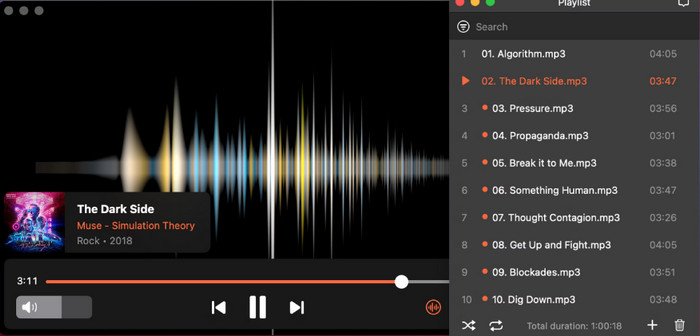
IINA includes a dedicated music mode that transforms the player into a minimalist audio player with album art and simplified controls.
What’s New in IINA Player 1.4.2?
The latest version includes several improvements focused on usability, performance, and bug fixes.
New Features
- Integration of the official plugin list for easier access to extensions
- Gapless audio playback for uninterrupted music enjoyment
- Improved control for opening files in multiple windows
- Configurable system media keys
Performance and Stability Improvements
Version 1.4.2 includes several optimizations:
- Reduced memory consumption when handling large files
- Improved playback stability
- Improved responsiveness
Bug fixes
Several issues from previous versions have been resolved:
- Playback speed control issues
- UI alignment issues
- Improved subtitle controls
- Full-screen display issues resolved
UI Improvements
- Improved font selection interface
- Better localization and translation support
- More intuitive settings navigation
These changes improve overall usability and the user experience.
You can also Download:
Valentina Studio Pro 17.3.0 for macOS
Screenshots:
System Requirements
Before installing IINA Player 1.4.2, make sure your Mac meets the following requirements.
Minimum Requirements
Operating System: macOS 10.15 (Catalina) or later
Processor: Intel or Apple Silicon
RAM: 4 GB
Storage: 200 MB of free space
Recommended Requirements
Operating System: macOS 12 (Monterey) or later
Processor: Apple Silicon (M1, M2, M3 or later)
RAM: 8 GB or more
Storage: 500 MB of free space
Display: Retina display for better visual quality
Meeting the recommended requirements ensures smoother playback and better performance, especially with high-resolution videos.
Advantages and Disadvantages of IINA Player 1.4.2
Advantages
- Free and open-source software
- Modern, native macOS design
- Compatible with almost all multimedia formats
- High-quality playback with MPV engine
- Advanced subtitle and streaming features
- Lightweight and efficient performance
- Regular updates and active development
Disadvantages
- Limited HDR support in some cases
- Occasional bugs with new macOS updates
- Not as comprehensive as some professional multimedia tools
- Requires some learning for advanced customization
Conclusion
IINA Player 1.4.2 for macOS is a powerful, modern, and easy-to-use multimedia player that combines advanced playback capabilities with the native Apple experience. Its integration with macOS features, along with compatibility with almost all multimedia formats, makes it a strong competitor to traditional media players.
Homepage: mactorrent.info