lwouis AltTab 11.0.0 For MacOS Download

AltTab is a free and open-source application for macOS, designed to provide the familiar Alt+Tab window-switching experience on Macs. Unlike the default Command+Tab switching behavior in macOS, AltTab displays live window previews, allowing users to switch directly between individual windows rather than just applications.
The latest version, AltTab 11.0.0 for macOS, offers performance improvements, enhanced compatibility with newer macOS versions, smoother animations, and additional customization features. It has become popular among developers, multitaskers, designers, office workers, and advanced users who manage multiple applications simultaneously.
Among AltTab’s key advantages are its lightweight design and extensive customization options. Users can adjust shortcuts, appearance, behavior, preview sizes, themes, and advanced switching rules to suit their workflow preferences.
Key Features of AltTab 11.0.0 for macOS:
Windows-Style App and Window Switching
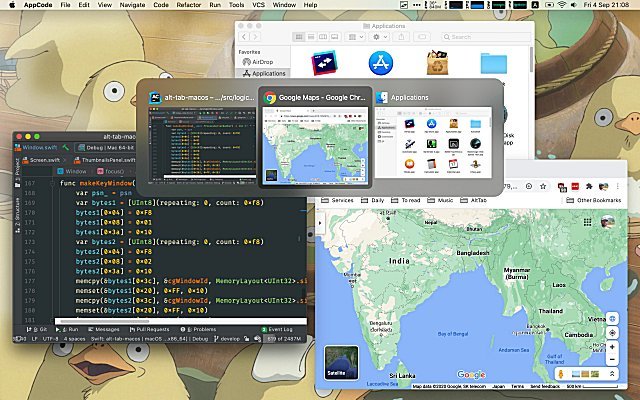
AltTab’s core feature is its Windows-inspired app and window switching interface. Unlike the default macOS app switcher, AltTab displays:
- Individually open windows
- Live window previews
- App thumbnails
- Window titles
This allows users to quickly identify and switch directly to the window they need.
For users who frequently multitask, this significantly improves workflow efficiency and navigation speed.
Live Window Previews
AltTab provides real-time window previews, greatly simplifying multitasking. Instead of guessing which application contains the required content, users can visually preview open windows before switching between them.
This feature is especially useful when working with:
- Multiple browser windows
- Multiple document editors
- Programming environments
- Design applications
- Communication tools
Live previews help reduce clutter and improve workspace organization.
Highly Customizable Interface
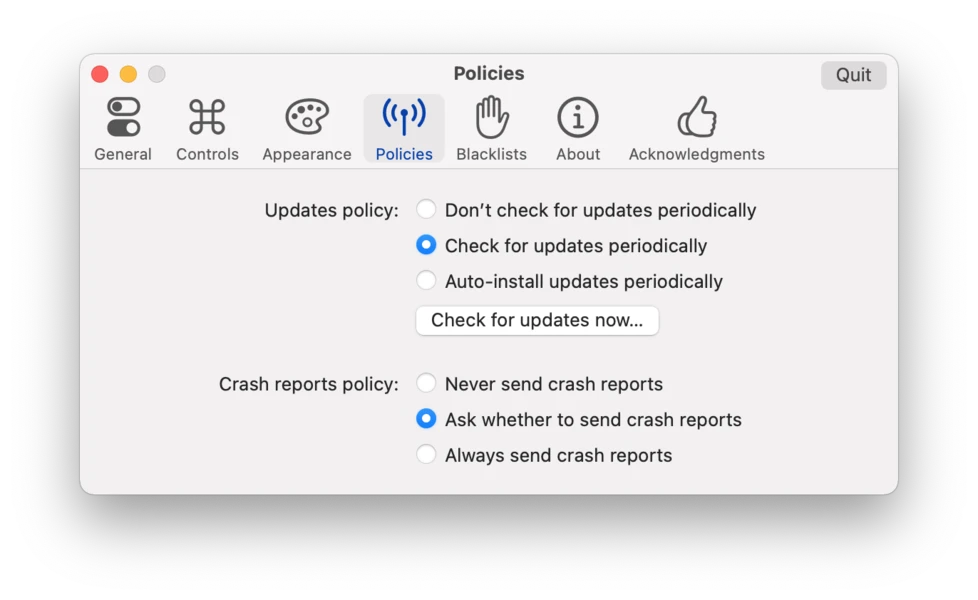
One of AltTab’s standout features is its comprehensive customization system. Users can customize virtually every aspect of the application, including:
- Shortcut keys
- Appearance themes
- Preview sizes
- Window layout
- Screen positioning
- Movement behavior
- Visibility rules
This flexibility allows users to create a workflow that perfectly suits their preferences.
Multi-monitor support
AltTab fully supports multi-monitor setups, allowing users to efficiently switch between windows across multiple monitors.
This feature benefits professionals such as:
- Programmers
- Video editors
- Traders
- Graphic designers
- Remote workers
The software intelligently manages window previews regardless of monitor settings.
Apple Silicon processor support
AltTab 11.0.0 is optimized for the latest Apple Silicon processors, including:
- Apple M1
- Apple M2
- Apple M3
Native support improves performance while reducing system resource and battery consumption.
This optimization ensures smooth operation on both Mac laptops and desktops.
Blocklist and Visibility Controls
Users can configure AltTab to ignore specific applications or hidden windows, helping to maintain a smoother switching interface.
Examples of excluded applications include:
- Background programs
- System applications
- Floating toolbars
- Hidden applications
What’s New in AltTab 11.0.0?
Version 11.0.0 introduces several improvements focused on performance, compatibility, and user experience.
Improved macOS Compatibility
The latest version enhances compatibility with newer macOS releases, including:
- macOS Ventura
- macOS Sonoma
- Future macOS updates
This ensures stable performance on modern Apple systems.
Faster Window Detection
AltTab 11.0.0 improves the speed at which it detects and previews windows. Now, users can switch between windows more smoothly with reduced lag.
This is especially useful when multiple applications are open simultaneously.
Improved Animation Performance
The latest version delivers enhanced animations and smoother transitions between windows.
The improved animation rendering contributes to a smoother and more responsive user experience.
Enhanced Optimization for Apple Silicon Processors
The developers have further optimized the application for Apple Silicon devices, resulting in:
- Fastier startup
- Lower CPU usage
- Better battery life
- Overall improved responsiveness
Stability improvements and bug fixes
Version 11.0.0 includes several bug fixes related to:
- Preview display
- Keyboard shortcuts
- Multi-monitor support
- Full-screen window handling
These improvements enhance the application’s reliability for everyday use.
You can also Download:
System Requirements
Before installing AltTab 11.0.0 for macOS, users should ensure their system meets the minimum requirements.
Minimum Requirements
- Operating System: macOS 10.14 Mojave or later
- Processor: Intel or Apple Silicon processor
- RAM: 4 GB
- Storage: 100 MB available space
These requirements are sufficient for normal multitasking and window management.
Recommended Requirements
For optimal performance and a seamless multitasking experience, the following specifications are recommended:
- Operating System: macOS Sonoma or later
- Processor: Apple M1, M2, or M3 chip
- RAM: 8GB or higher
- SSD storage recommended
- Multi-monitor setup support
Using the recommended hardware improves performance when handling a large number of open windows and applications.
Advantages and Disadvantages:
Advantages
Excellent Window Management
- AltTab significantly improves window switching speed compared to the default macOS behavior.
Free and Open Source
- Completely free software with ongoing community development.
Highly Customizable
- Users can extensively customize the appearance, shortcuts, and behavior.
Lightweight and Fast
- Minimum system resource usage ensures smooth operation.
Optimized Apple Silicon Processor Performance
- Native support delivers excellent performance on modern Macs.
Multi-monitor Support
- Ideal for advanced multitasking environments.
Increased Productivity
- Keyboard navigation speeds up workflow and reduces distractions.
Disadvantages
Requires Access Permissions
- Users must grant access permissions to take advantage of all features.
Difficulty Learning for Beginners
- Some customization settings may seem complex at first for new users.
Occasional Compatibility Issues
- Rare macOS updates may temporarily affect performance until patches are released.
Not an Official Apple Feature
- Because AltTab is a third-party tool, system-level limitations may occasionally occur.
Conclusion:
lwouis AltTab For MacOS version 11.0.0 provides the best tools available for optimizing window management and various tasks on Macs. By adding Windows-like Alt+Tab functionality to macOS, the software delivers a faster, smoother, more customizable, and more secure user experience.