AirMail PRO 26.0.19 for MacOS Download

AirMail PRO for MacOS 26.0.19 is a powerful and modern email client designed for professionals, business users, and productivity enthusiasts who require advanced customization and workflow automation. Developed by Bloop S.R.L., AirMail has become a popular alternative to Apple Mail by offering enhanced features, smarter inbox management, and seamless integration with productivity tools.
It’s an email client optimized for macOS and iOS, focused on performance and a simple interface. It supports IMAP, POP3, Yahoo!, AOL, Outlook, and Live.com. (iCloud, Yahoo!, AOL, MS Exchange, Gmail, Google Apps, IMAP, POP3, Outlook, and Live.com)
AirMail Pro 2026 for Mac is a very practical and simple email client that greatly simplifies checking your inbox, managing messages, and composing emails. It was developed to allow you to access multiple email accounts from an intuitive interface. With this application, you can access different email accounts from a wide variety of email service providers, such as Yahoo! Mail, AOL, Gmail, iCloud, and many other popular services.
Key Features of AirMail PRO for macOS
One of the main advantages of AirMail PRO is its ability to manage multiple email accounts in a single, unified inbox. Supported email services include:
- Gmail
- Outlook
- iCloud
- Yahoo Mail
- Exchange
- IMAP and POP3 accounts
Users can easily switch between accounts or view all emails in a centralized dashboard. This is especially useful for professionals who manage both work and personal emails simultaneously.
Smart Inbox and Filtering
AirMail PRO for Mac features smart filtering and smart folders to prioritize important emails. Key benefits include:
Automatic categorization of newsletters and promotional emails
- Custom rules and filters
- VIP sender tracking
- Repeat reminders and follow-up
These tools help users maintain an organized inbox and focus on the most important communications.
Advanced Customization Options
Customization is one of AirMail PRO’s most distinctive features. Users can personalize:
- Design and themes
- Swipe gestures
- Keyboard shortcuts
- Toolbar actions
- Notification settings
This flexibility ensures the app adapts to individual workflows rather than forcing users into a rigid structure.
Workflow Automation and Integrations
AirMail PRO integrates with numerous third-party productivity apps, including:
- Todoist
- Trello
- Asana
- Things
- OmniFocus
- Slack
With built-in automation actions, users can turn emails into tasks, notes, or reminders with a single click. This seamless integration improves productivity and reduces manual effort.
Optimization for Apple Silicon
Version 26.0.19 is fully optimized for Apple Silicon processors. As a result, users benefit from:
- Faster startup times
- Lower memory usage
- Improved battery efficiency
- Easily multitasking
This native compatibility ensures efficient AirMail PRO for Mac performance on modern Mac devices.
Privacy and Security Features
Security is essential for any email client. AirMail PRO supports:
- End-to-end encryption (when supported by the email provider)
- OAuth authentication
- Secure login protocols
- Data privacy controls
These features give users confidence when managing sensitive communications.
Custom Rules and Actions Engine
The built-in rules engine allows users to create automated workflows. For example:
- Automatically archive emails from specific senders
- Apply labels to certain subjects
- Forward important messages to team members
- This advanced rules system is ideal for professionals who process large volumes of email daily.
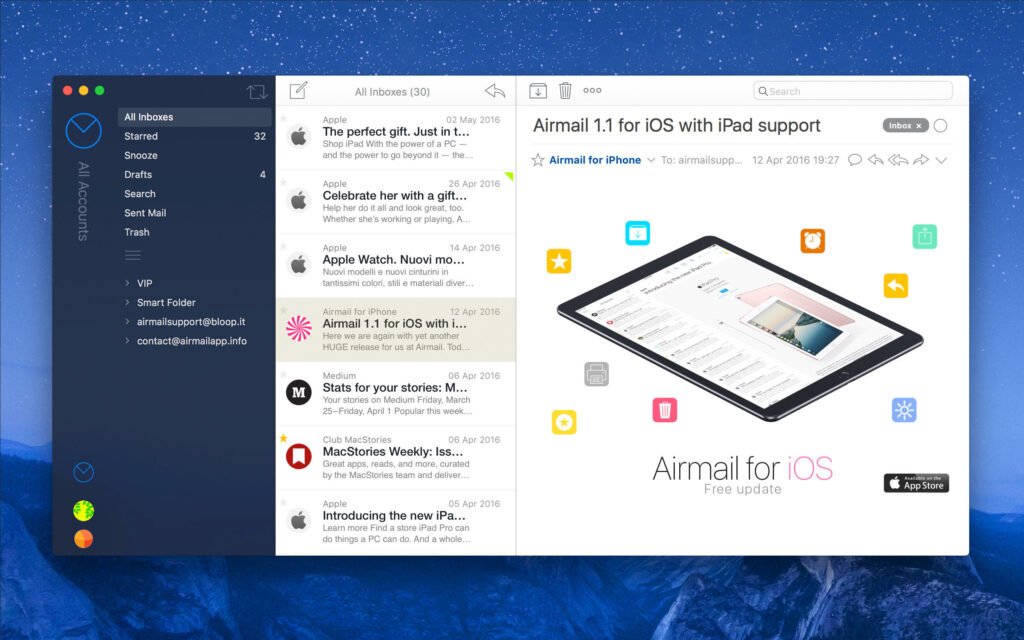
Modern and Clear User Interface
AirMail PRO for Mac offers a sleek and visually appealing interface. It supports:
- Dark and Light Modes
- Retina Display Optimization
- Adjustable Font Sizes
- Customizable Sidebar Design
- The interface combines aesthetics and usability, making it ideal for long work sessions.
What’s New in AirMail PRO 26.0.19
The 26.0.19 update introduces several improvements designed to optimize performance, compatibility, and the overall user experience.
Improved macOS Compatibility
AirMail PRO 26.0.19 is optimized for the latest macOS versions, ensuring better system integration and smoother background operations.
Improved Apple Silicon Performance
While previous versions supported Apple Silicon, this update refines the native optimization. Users may notice:
- Faster synchronization
- Improved responsiveness
- Reduced CPU spikes during high-volume inbox updates
- 3. Bug fixes and stability improvements
- This update addresses previously reported issues, including:
- Occasional synchronization delays
- Notification inconsistencies
- Minor UI glitches
These improvements contribute to a more stable and reliable email experience.
Improved search performance
- The search function has been improved to deliver faster and more accurate results when analyzing high-volume inboxes. This is especially beneficial for business users who rely heavily on email archives.
you can also Download: Telegram Desktop 6.5.1 for MacOS
Screenshots:

System Requirements
Before installing AirMail PRO for Mac 26.0.19, ensure your system meets the necessary specifications.
Minimum Requirements
- MacOS 11 Big Sur or later
- 64-bit Intel or Apple Silicon processor
- 4 GB of RAM
- 500 MB of available disk space
- Internet connection for account synchronization
Recommended Requirements
For optimal performance and professional use:
- MacOS 12 Monterey or later
- Apple Silicon processor (M1, M2, M3)
- 8 GB of RAM or more
- SSD storage
- High-speed, stable internet connection
Meeting the recommended specifications ensures smoother synchronization and improved multitasking capabilities.
Advantages and Disadvantages of AirMail PRO for macOS
Advantages
- Powerful customization options
- Highly adaptable interface and workflow controls.
- Excellent integration with productivity apps
- Compatible with task management and collaboration tools.
- Unified inbox for multiple accounts
- Centralized email management improves efficiency.
- Optimized for Apple Silicon
- Improved performance on modern Mac systems.
- Advanced automation rules
- Ideal for users with high email volumes.
- Clean and modern interface
- Intuitive design, ideal for long-term use.
Disadvantages
- Premium subscription model
- The PRO version requires a paid subscription.
- Learning curve for advanced features
- New users may need time to explore the automation tools.
- Extensive customization may overwhelm casual users
- The abundance of options may not appeal to minimalists.
Conclusion
AirMail PRO for Mac 26.0.19 stands out as a highly customizable and feature-rich email client designed for productivity-conscious users. With robust automation tools, seamless integration with third-party applications, and solid optimization for Apple Silicon, it offers a compelling alternative to macOS’s default email solutions.
The latest update improves performance, system compatibility, and search functionality, making it even more reliable for professional environments. While the subscription model may not be suitable for all users, the advanced features and workflow flexibility justify the investment for those who rely heavily on email.
In short, AirMail PRO 26.0.19 offers speed, customization, and productivity improvements that make it an excellent choice for Mac users seeking a powerful and modern email management solution.
Homepage: https://mactorrent.info/