Darktable 5.4.1 for MacOS Download
Darktable 5.4.1 for Mac is a powerful open-source photo editing and RAW processing software designed for photographers seeking professional control over their images. Often described as a virtual darkroom, Darktable allows users to manage digital negatives, perform non-destructive editing, and export high-quality photographs with precision.
Darktable functions as a computerized darkroom, allowing photographers to efficiently manage their digital negatives. It’s an open-source workflow application designed specifically to meet the needs of photography professionals.
As photography evolves in the digital age, RAW photo editors have become essential tools for both amateurs and professionals. Darktable stands out by offering advanced image processing features comparable to those of premium photo editing software, while being completely free and open source. This makes it an attractive option for photographers looking for a robust alternative for Mac.
Key Features of Darktable for macOS
One of Darktable’s most important features is its non-destructive editing workflow. This means:
- Original RAW files remain untouched
- Edits are stored as metadata
- Multiple versions of the same image can be created
- Changes can be reverted at any time
This approach ensures maximum image quality and flexibility throughout the editing process.
Advanced Image Processing Modules
Darktable 5.4.1 for Mac includes a wide range of professional modules, such as:
- Exposure Correction
- White Balance Adjustment
- Tone Equalizer
- Color Calibration
- Noise Reduction
- Sharpening Tools
- Lens Correction
These modules provide granular control over every aspect of an image.
Effects and Editing
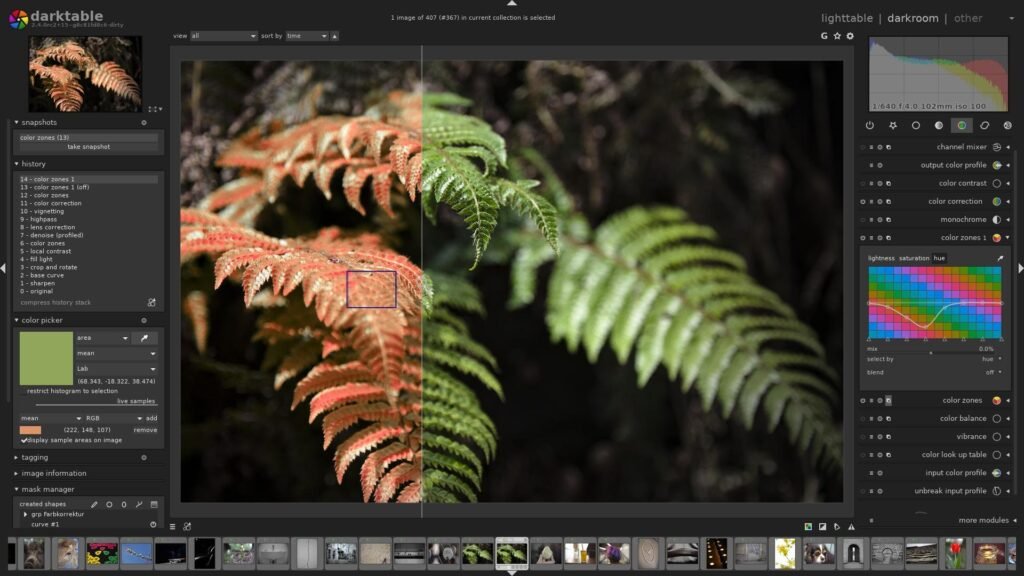
- Darktable is more than just a post-production editing program, but it certainly offers many features in both areas. It includes watermarking, vignetting, and color correction. It is compatible with numerous operating systems.
High-Performance RAW Processing
Darktable supports a wide variety of camera RAW formats. It’s optimized for:
- High-resolution images
- Batch processing
- Efficient GPU acceleration
- Apple Silicon performance enhancements
This ensures smooth editing even with large photo libraries.
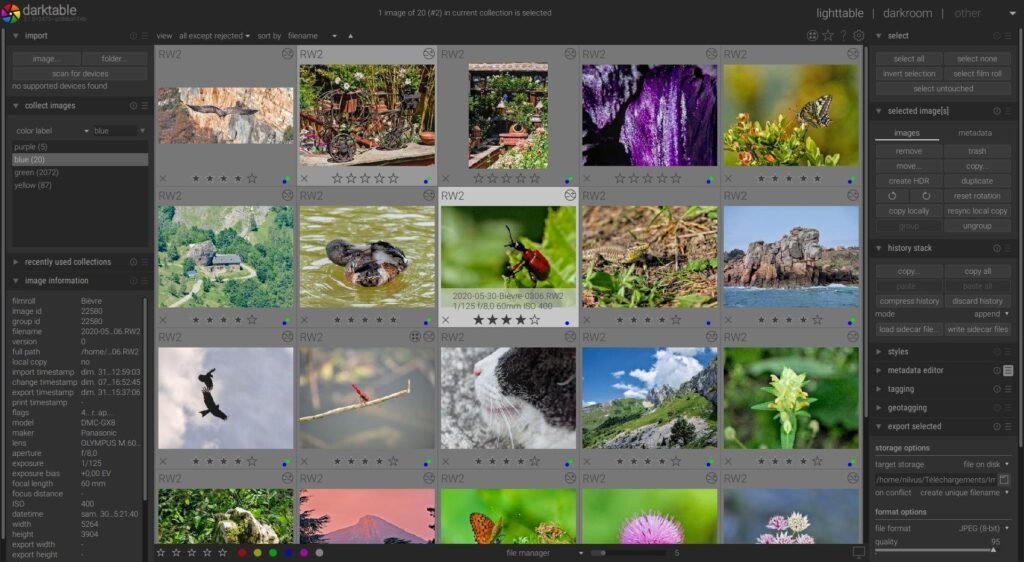
Comprehensive Photo Management
In addition to editing tools, Darktable functions as a digital asset management system. Users can:
- Organize images using tags
- Rate and tag photos by color
- Filter by metadata
- Search by file properties
This helps photographers efficiently manage large photo collections.
Advanced Color Management
Color accuracy is crucial in professional photography. Darktable supports:
- ICC color profiles
- Wide color gamut displays
- On-screen proofing
- Camera-specific color calibration
These features allow photographers to maintain consistent color across all devices and prints.
Masking and Blending Options
Darktable 5.4.1 for Mac offers powerful masking tools, including:
- Parametric Masks
- Drawn Masks
- Gradient Masks
- Blend Modes
This allows users to apply precise local adjustments.
What’s New in Darktable 5.4.1
Version 5.4.1 introduces several improvements focused on stability, performance, and usability.
Improved macOS Compatibility
- Darktable 5.4.1 for Mac offers greater compatibility with the latest macOS versions, including optimizations for Apple Silicon processors. This results in improved performance and reduced resource consumption.
Enhanced Performance
- The update improves GPU acceleration and memory management, ensuring smoother editing of high-resolution images.
Expanded Camera Support
- New camera models have been added to the support list, increasing compatibility with modern photography equipment.
Bug Fixes and Stability Improvements
- Several minor issues from previous versions have been resolved, improving workflow reliability and stability.
you can also Download: DaVinci Resolve Studio 20.3.2 for Mac
Screenshots:
System Requirements
Before installing Darktable 5.4.1 for Mac, ensure your system meets the following requirements.
Minimum Requirements
- MacOS 11 Big Sur or later
- Intel or Apple Silicon processor
- 4 GB of RAM
- 500 MB of available disk space
- OpenCL-compatible GPU (recommended, but not required)
Recommended Requirements
- MacOS Monterey, Ventura, or later
- Apple Silicon (M1, M2, or later)
- 8 GB of RAM or more
- SSD storage for faster image loading
- OpenCL-compatible dedicated GPU
Meeting the recommended specifications ensures smoother editing and faster processing speeds.
Advantages and Disadvantages
Advantages
- Completely free and open source
- Professional-level RAW editing tools
- Non-destructive workflow
- Wide camera compatibility
- Advanced masking and color management
- Excellent performance on macOS
Disadvantages
- Steaker learning curve for beginners
- The interface can be complex at first
- Fewer AI-based automated features compared to premium software
- Limited built-in cloud syncing
Despite these limitations, Darktable remains a powerful solution for professional photographers.
Conclusion
Darktable 5.4.1 for Mac is a professional-level RAW photo editing software that combines powerful image processing tools with a flexible, non-destructive workflow. Its advanced modules, powerful color management, and digital asset management features make it ideal for both amateurs and professionals. Version 5.4.1’s improvements enhance compatibility, performance, and camera support for macOS, ensuring reliable editing even on modern Apple Silicon devices. While the interface may require some learning, the depth of control and precision offered by Darktable are impressive.
For photographers seeking a feature-rich, open-source RAW editor for macOS, Darktable 5.4.1 for Mac presents itself as an attractive and cost-effective solution for high-quality photo processing and creative image development.
Homepage: https://mactorrent.info/
2 comments