Google Chrome Canary 148.0.7736.0 for MacOS Download

Unlike the standard Chrome browser, Google Chrome Canary for Mac is updated daily. This means users can explore the latest web technologies, developer tools, and browser innovations as soon as they’re released. However, as an experimental version, it may occasionally contain bugs or unstable features.
Google Canary offers daily builds for developers. Stay ahead of the web.
Develop websites for the next version of the web.
Test the latest web platform APIs.
Daily updates.
For those who want to try advanced web features, optimize websites, or simply stay ahead of the curve, Chrome Canary for macOS offers a powerful and flexible browsing experience. In this detailed guide, we’ll explore its main features, the latest updates, system requirements, advantages, and limitations.
Key Features of Google Chrome Canary for macOS
One of the biggest advantages of Google Chrome Canary for macOS is access to experimental features before their release in the stable version. Users can enable or disable these features using Chrome Flags (chrome://flags).
This allows developers and tech enthusiasts to
- Test new web APIs
- Experiment with advanced rendering engines
- Preview interface changes
- Evaluate performance improvements
As a result, Chrome Canary becomes an essential tool for web development and software testing.
Daily Automatic Updates
Chrome Canary is updated automatically and frequently, sometimes several times a week. These updates include:
- Bug fixes
- Security patches
- Feature experiments
- Performance optimizations
Thanks to these frequent updates, users always have access to the latest browser innovations. However, this also means that stability may vary.
Advanced Developer Tools
Google Chrome Canary for macOS includes the latest version of Chrome DevTools. Developers can benefit from:
- Enhanced JavaScript debugging
- Advanced CSS inspection tools
- Real-time performance monitoring
- Network request analysis
- Lighthouse auditing tools
These tools help developers identify problems, optimize website performance, and ensure compliance with modern web standards.
Separate Installation from the Stable Chrome Version
- One of the most practical features is that Chrome Canary is installed separately from the stable version of Chrome. This means that both browsers can be run simultaneously without conflicts.
- This separation allows users to:
- Safely test new features
- Compare performance between versions
- Continue using the stable version of Chrome for daily browsing
- Therefore, Chrome Canary does not interfere with the main browsing workflow.
Enhanced Performance Testing
Because Chrome Canary introduces new rendering engine updates early, it’s ideal for performance benchmarking. Developers can test:
- Page load speed
- JavaScript execution
- Memory usage
- GPU acceleration performance
- This is especially useful for modern web applications and Progressive Web Apps (PWAs).
What’s New in Google Chrome Canary for Mac 148.0.7736.0
Build 144.0.7559.97 introduces several performance and stability improvements. While Canary builds are primarily focused on experimentation, this version includes significant updates.
Rendering Engine Improvements
- The latest version includes initial improvements to the Chromium rendering engine. As a result, pages load more efficiently, and complex web applications run more smoothly.
Enhanced DevTools Features
- Developers can now benefit from updated DevTools panels with improved debugging accuracy and expanded network analysis tools. These improvements help developers diagnose performance bottlenecks more effectively.
Security and Privacy Updates
- Version 148.0.7736.0 introduces pre-testing for enhanced Privacy Sandbox features. These updates aim to better prevent tracking while maintaining compatibility with website advertising.
Memory Management Optimization
- Google continues to optimize memory usage in Chrome Canary. This version includes improvements that reduce RAM consumption when multiple tabs are open.
Stability Improvements
- While Chrome Canary is inherently experimental, this build includes fixes for previously reported bugs.
- minor interface errors and errors.
you can also Download: Google Chrome 146.0.7680.80 for Mac
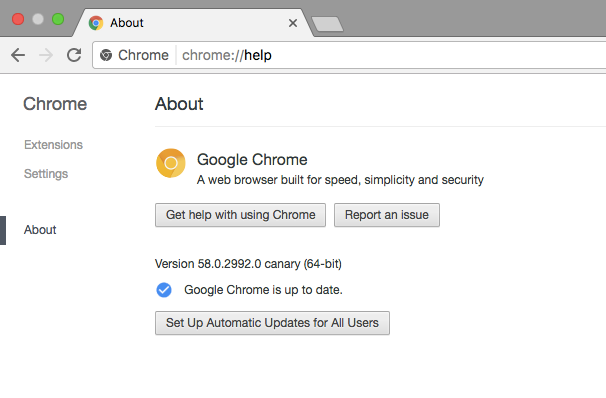
Screenshots:
System Requirements
Before installing Google Chrome Canary for Mac 148.0.7736.0, it’s important to ensure your system meets the necessary requirements.
Minimum Requirements
- MacOS 11 Big Sur or later
- Intel or Apple Silicon processor (M1, M2, M3)
- 4 GB of RAM
- At least 500 MB of available disk space
- Internet connection for updates
Recommended Requirements
- MacOS 12 Monterey or later
- Apple Silicon processor (M1 or later) for optimal performance
- 8 GB of RAM or more
- SSD storage
- High-speed internet connection
Meeting the recommended requirements ensures smoother performance, especially when using development tools and running multiple tabs.
Advantages and Disadvantages of Google Chrome Canary for macOS
Advantages
- Access to the latest experimental features
- Powerful developer tools
- Separate installation from the stable version of Chrome
- Frequent updates and improvements
- Early security improvements
- Ideal for web development and testing
Disadvantages
- Can be unstable or crash unexpectedly
- Experimental features may harm websites
- Not ideal for daily browsing
- Frequent updates can consume bandwidth
- Some features may never make it to the stable version
Therefore, while Chrome Canary offers advanced features, it is better suited for testing than for daily use.
Conclusion
Google Chrome Canary for Mac is a powerful and cutting-edge browser designed for developers, testers, and tech enthusiasts. By providing early access to experimental features, advanced developer tools, and state-of-the-art security updates, it plays a crucial role in the future of web browsing.
While it may not offer the stability needed for daily use, Chrome Canary excels as a testing environment. Its standalone installation, frequent updates, and robust performance monitoring tools make it an essential complement for anyone involved in web development.
If you want to explore upcoming browser innovations and stay ahead of web technology trends, Google Chrome Canary for macOS is an excellent choice. However, for routine browsing tasks, the most practical option is to combine it with the stable version of Chrome.
Homepage: https://mactorrent.info