Final Cut Pro 12.0 for MacOS Download

Final Cut Pro for macOS is a professional video editing software developed by Apple and widely recognized for its powerful performance, intuitive interface, and deep integration with the Apple ecosystem. Used by filmmakers, YouTubers, content creators, video editors, and media professionals worldwide, Final Cut Pro offers advanced editing features while maintaining exceptional speed and stability on Mac systems.
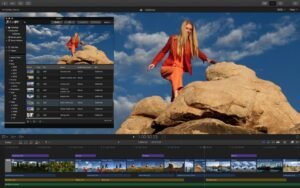
Redesigned from the ground up, Final Cut Pro combines revolutionary video editing with powerful media organization and incredible performance so you can create at the speed of thought.
With the release of Final Cut Pro version 12.0, Apple continues to refine its flagship video editing solution, improving performance, streamlining workflows, and expanding creative tools. Designed to take full advantage of Apple silicon and modern macOS technologies, this version delivers smoother playback, faster rendering, and enhanced media management.
Key Features of Final Cut Pro for macOS
One of Final Cut Pro’s most distinctive features is the Magnetic Timeline, which automatically adjusts clips to avoid gaps and sync issues. This feature allows editors to quickly rearrange scenes without disrupting audio or video alignment, significantly improving workflow efficiency.
The Magnetic Timeline is especially useful for dynamic editing environments where speed and accuracy are critical.
Powerful multimedia organization
- Organize your work into libraries for efficient multimedia management and collaboration
- Create proxy copies of your media files for greater portability and performance
- Automatic content analysis captures camera metadata and analyzes footage in the background
- Create and apply custom keywords or favorites on the fly by selecting clip ranges
Advanced Video Editing Tools
- Final Cut Pro offers a comprehensive suite of professional editing tools, including trimming, multicam editing, keyframe animation, and advanced transitions. Editors can work on complex projects while maintaining complete creative control.
- The software supports high-resolution formats, such as 4K, 8K, HDR, and 360-degree video, making it ideal for both online content and feature film productions.
Color Grading and Powerful Effects
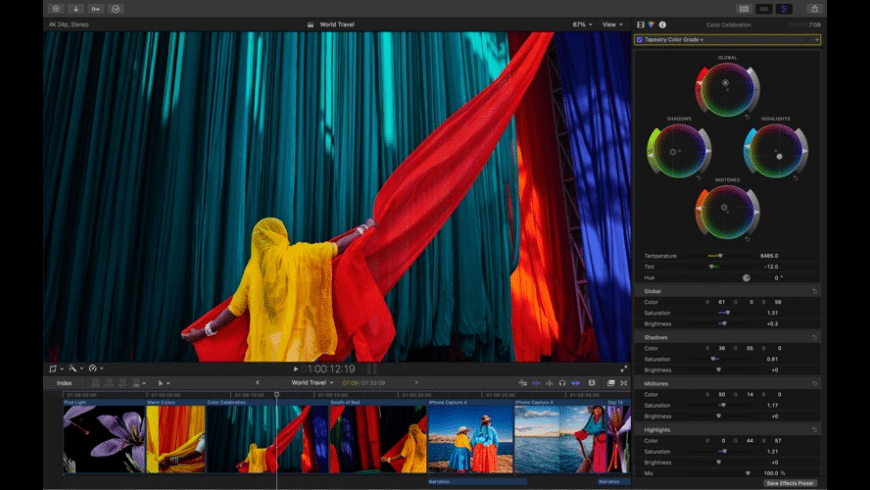
- Final Cut Pro includes advanced color grading tools, such as color wheels, curves, and hue/saturation controls. These features allow users to adjust colors, exposure, and create cinematic looks directly within the application.
- Built-in visual effects, transitions, and customizable presets help editors enhance their videos without relying on third-party plugins.
Smooth Audio Editing
- Audio editing in Final Cut Pro is powerful and intuitive. Users can easily apply audio enhancements, remove background noise, and balance sound levels. Support for multichannel audio and professional sound formats ensures high-quality audio output.
- Integration with Logic Pro further streamlines audio workflows for users who require advanced sound design features.
Optimized Performance on Apple Silicon
- Final Cut Pro is fully optimized for Apple Silicon processors, delivering exceptional performance on Macs M1, M2, and later. This optimization results in faster rendering, smoother playback, and lower power consumption.
- Editors can work with large projects and high-resolution media without experiencing slowdowns.
What’s New in Final Cut Pro 12.0
Final Cut Pro 12.0 introduces performance improvements that optimize timeline responsiveness, rendering speed, and overall system stability. These improvements are especially noticeable when working with complex effects, large media libraries, or high-resolution footage.
The updated version ensures a smoother editing experience on modern macOS systems.
Enhanced Media Management
- Media organization has been refined with improved library management tools. Editors can now manage large projects more efficiently, locate assets more quickly, and maintain cleaner workflows.
- Optimized background processing also ensures minimal interruptions during editing sessions.
Improved macOS Integration
- Final Cut Pro 12.0 offers enhanced compatibility with the latest macOS versions, ensuring seamless operation with Apple’s operating system features. This includes improved support for Metal graphics, optimized memory usage, and smoother multitasking.
- These updates help editors take full advantage of modern Mac hardware.
Bug Fixes and Workflow Improvements
- In addition to performance updates, this release includes numerous bug fixes and workflow improvements. These changes improve reliability, reduce crashes, and optimize the user experience for both new and experienced editors.
you can also Download: Adobe Photoshop 2026 v27.4.0 for Mac
Screenshots:
System Requirements for Final Cut Pro 12.0
Minimum Requirements
To run Final Cut Pro 12.0 on macOS, your system must meet the following minimum requirements:
- Operating System: Supported macOS version
- Processor: Intel for Mac or Apple Silicon processor
- RAM: 8 GB minimum
- Graphics: Metal-compatible graphics card
- Storage: At least 5 GB of free disk space
- Display: 1280 × 768 resolution or higher
These minimum specifications allow you to perform basic editing tasks and standard video projects.
Recommended Requirements
For optimal performance and professional workflows, the following system specifications are recommended:
- Operating System: Latest version of macOS
- Processor: Apple Silicon processor (M1, M2, or later)
- RAM: 16 GB or more
- Graphics: Integrated Apple GPU or high-performance GPU compatible with Metal
- Storage: SSD with ample free space
- Display: Retina display or high-resolution external display
Advantages and Disadvantages of Final Cut Pro for macOS
Advantages
- Professional-level video editing tools
- Optimized performance for Apple Silicon
- Intuitive interface with Magnetic Timeline
- Excellent support for high-resolution formats
- Seamless integration with macOS and Apple apps
- One-time purchase with no subscription fees
Disadvantages
- Available only for macOS
- Learning curve for users switching from other editors
- Limited collaboration features compared to the competition
- Smaller plugin ecosystem than some third-party platforms
Despite these limitations, Final Cut Pro remains a top-tier editing solution for Mac users.
Conclusion
Final Cut Pro 12.0 continues to set the standard for professional video editing on Apple platforms. With its powerful editing tools, advanced color grading, smooth performance, and deep integration with macOS, it offers an efficient and reliable solution for video creators of all levels.
The latest updates offer improved performance, streamlined media handling, and better system compatibility, making it an excellent choice for modern workflows. While exclusive to macOS, this exclusivity allows Final Cut Pro to take full advantage of Apple’s hardware and software technologies.
In short, Final Cut Pro 12.0 is an excellent video editing application for Mac users seeking speed, precision, and professional results without the need for an ongoing subscription.
Homepage: https://mactorrent.info
One comment