Aiarty Video Enhancer 3.6 for MacOS Download

Aiarty Video Enhancer for Mac 3.6 is a powerful video enhancement and upscaling software designed to help users easily improve the quality of their video content. Whether you’re a professional content creator, filmmaker, or casual user, Aiarty Video Enhancer for Mac offers advanced tools for sharpening, noise reduction, upscaling, and restoring videos. In today’s digital age, video quality plays a critical role in viewer engagement and the overall impact of content. With the increasing demand for high-resolution output, video enhancement software like Aiarty has become essential.
Next-generation AI video enhancement software generates more detail, reduces noise, eliminates blur, improves resolution, and restores flawed videos to 4K clarity. Thanks to its specialized AI models, it delivers superior visual quality at turbo speed, empowering content creators and video enthusiasts.
Aiarty Video Enhancer stands out for its combination of intelligent algorithms, intuitive interface, and support for high-definition and ultra-high-definition media. Version 3.6 introduces performance improvements, greater format support, and faster processing speeds, especially for Mac users with modern versions of macOS and Apple Silicon hardware.
Key Features of Aiarty Video Enhancer for macOS
Aiarty Video Enhancer offers a suite of features designed to improve visual quality, clarity, and detail. Below are the key features that make this software a valuable tool for video editing and enhancement.
Highly fluid slow motion
- The frame interpolation module uses artificial intelligence to generate new high-quality frames, ready for smooth, fluid 8X/16X slow motion.
Video Upscaling and Resolution Enhancement
- Aiarty Video Enhancer for Mac excels at upscaling videos from low to high resolutions, such as 480p to 720p, 1080p to 4K, or even 8K. Its intelligent upscaling engine analyzes pixel data and intelligently predicts additional image details, resulting in sharper, clearer images without significant distortion.
This feature is especially useful for
- Restoring old footage
- Improving resolution for streaming platforms
- Preparing videos for large screens
Noise and Artifact Removal
When working with compressed or older videos, unwanted noise and compression artifacts can degrade the quality. Aiarty includes advanced noise removal tools to:
- Reduce visual noise
- Remove blocky compression artifacts
- Smooth grainy images without losing detail
These tools help restore video clarity, making footage look more professional.
Video Stabilization
- Shaky footage can negatively impact viewer engagement. Aiarty Video Enhancer features a stabilization tool that corrects camera shake and motion instability. Whether recorded with mobile devices or handheld cameras, videos become smoother and more enjoyable to watch after stabilization.
Color Correction and Enhancement
Color grading is essential for achieving a cinematic look. Aiarty offers adaptive color correction tools that allow users to:
- Adjust brightness, contrast, and saturation
- Improve color balance
- Improve white balance
- Correct exposure problems
This feature is especially useful for recording in low-light conditions.
Frame Interpolation and Motion Smoothing
- To improve playback smoothness, Aiarty supports frame interpolation technology. This tool generates intermediate frames to increase the frame rate, resulting in smoother motion in videos, especially useful for action sequences or slow-motion footage.
Multiple Export Formats
Aiarty supports exporting videos in various formats, including:
- MP4
- MOV
- AVI
- MKV
- HEVC (H.265)
Thanks to its flexible format support, users can optimize videos for different platforms and devices without needing additional conversion tools.
What’s New in Aiarty Video Enhancer 3.6
Version 3.5 includes several useful updates that improve performance, compatibility, and usability for macOS users.
Improved Apple Silicon Compatibility
Aiarty 3.5 includes optimized performance for Apple Silicon processors (M1, M2, and later). This results in:
- Faster video processing speeds
- Lower CPU and memory usage
- Improved energy efficiency
- Stable performance with high-resolution projects
As a result, macOS users with modern hardware will notice significant improvements in both speed and responsiveness.
Improved Noise Reduction Algorithms
- The latest update refines noise reduction performance by more accurately reducing visual noise while preserving natural details. This is especially useful for recordings with significant compression artifacts.
Expanded Format Support
- Version 3.5 increases support for modern video codecs and formats, ensuring greater compatibility with videos captured by various devices, such as drones, action cameras, and smartphones.
User Interface and Workflow Improvements
- Minor interface improvements make navigating the software easier. Task setup wizards and preset management tools have been improved
- Designed for smoother operation, especially in batch processing.
Bug Fixes and Stability Improvements
- This update addresses previous bugs related to export delays, blocking issues during long processing queues, and display inconsistencies. Overall, system stability has been improved.
you can also Download: MAXON Cinema 4D 2024.1.0 for MacOS
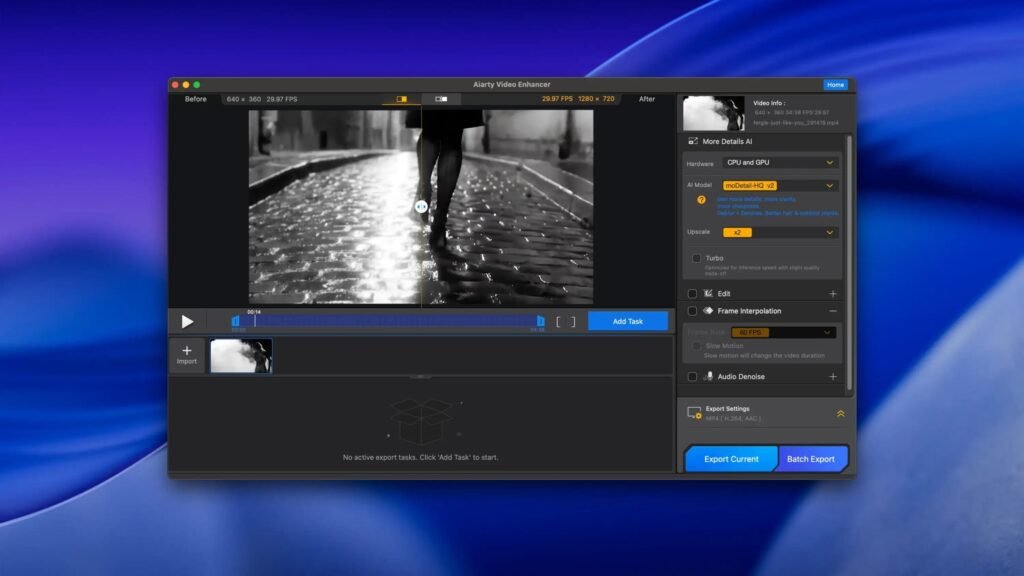
Screenshots:

System Requirements
Before installing Aiarty Video Enhancer for Mac 3.6, ensure your system meets the following requirements.
Minimum Requirements
- MacOS 11 Big Sur or later
- Intel-based Mac or Apple Silicon processor (Rosetta 2 compatible for Intel support)
- 8 GB of RAM
- 2 GB of available disk space
- Metal-compatible GPU
- Stable internet connection for activation and updates
Recommended Requirements
- MacOS 12 Monterey or later
- Apple Silicon (M1, M2, or later)
- 16 GB of RAM or more for high-resolution processing
- SSD storage for faster file management
- Dedicated graphics GPU with 4 GB or more of VRAM
Meeting the recommended specifications ensures smoother performance, especially when working with 4K or higher resolution footage.
Advantages and Disadvantages of Aiarty Video Enhancer for macOS
Advantages
- Advanced Upscaling Technology
- Intelligent algorithms significantly improve video quality.
- Wide Format Compatibility
- Multiple export options make it versatile for various platforms.
- Optimization for Apple Silicon
- Performance improvements on modern Mac hardware.
- Color Correction and Noise Removal Tools
- Improve visual quality with minimal effort.
- Batch Processing
- Efficient workflow for multiple files.
- Intuitive Interface
- Accessible to both beginners and professionals.
Disadvantages
- High Hardware Requirements
- Advanced processing may require powerful Macs for optimal performance.
- Paid Software
- The full feature set requires a purchase, which may deter some casual users.
- Limited support for 3D or complex visual effects
- It focuses primarily on 2D video enhancement rather than compositing or visual effects workflows.
Despite these minor drawbacks, Aiarty Video Enhancer remains a strong contender in the macOS video enhancement software category.
Conclusion
Aiarty Video Enhancer for Mac 3.6 is a powerful and intuitive solution for those looking to improve the quality of their video content. From upscaling and denoising to color correction and frame interpolation, Aiarty offers a comprehensive set of tools designed to enhance visual fidelity without requiring advanced technical knowledge. The latest update includes improved Apple Silicon support, refined algorithms, and broader format compatibility, making it ideal for modern Mac users.
Whether you’re creating content by preparing videos for social media, restoring stock footage, or are a professional enhancing high-definition content, Aiarty Video Enhancer delivers reliable performance and noticeable improvements. While it requires powerful hardware for high-resolution projects and a purchase to unlock all features, its intuitive interface and robust feature set make it a valuable addition to any video toolkit.
In short, Aiarty Video Enhancer for Mac 3.6 offers a balanced combination of performance, ease of use, and advanced enhancement tools, making it an excellent choice for users seeking professional-quality video enhancements.
Homepage: https://mactorrent.info/
2 comments