Infuse Pro 8.4.1 for MacOS
Infuse Pro 8.4.1 for MacOS Download

Here’s an elegant way to watch almost any video format on your iPhone, iPad, Apple TV, and Mac. No more converting files. With powerful streaming options, Trakt synchronization, and unparalleled AirPlay and subtitle compatibility, this app delivers a beautiful interface, precise controls, and exceptionally smooth playback.
In the digital age, multimedia consumption is no longer limited to simply playing videos. Users now demand high-quality streaming, simplified library management, and compatibility with a wide range of formats. Infuse Pro 8.4.1 for macOS stands out as one of the most powerful and elegant media players available for Mac. Designed for optimal performance and an intuitive user experience, it offers advanced playback features and a visually stunning interface.
Infuse Pro is especially popular among users looking for a reliable solution for playing high-resolution videos, including 4K HDR content, without the need for additional codecs. Whether you’re managing your personal video library or playing content from network drives, Infuse Pro ensures a smooth and professional experience.
Key Features of Infuse Pro 8.4.1Wide Format Compatibility:
One of Infuse Pro’s standout features is its ability to play virtually any video format without requiring additional codecs. It supports formats such as:
- MP4, MKV, AVI, WMV
- ISO, BDMV, and VIDEO_TS
- HEVC (H.265) and H.264
- Dolby Vision and HDR10
This ensures users can enjoy their media files without compatibility issues.
Attractive User Interface:
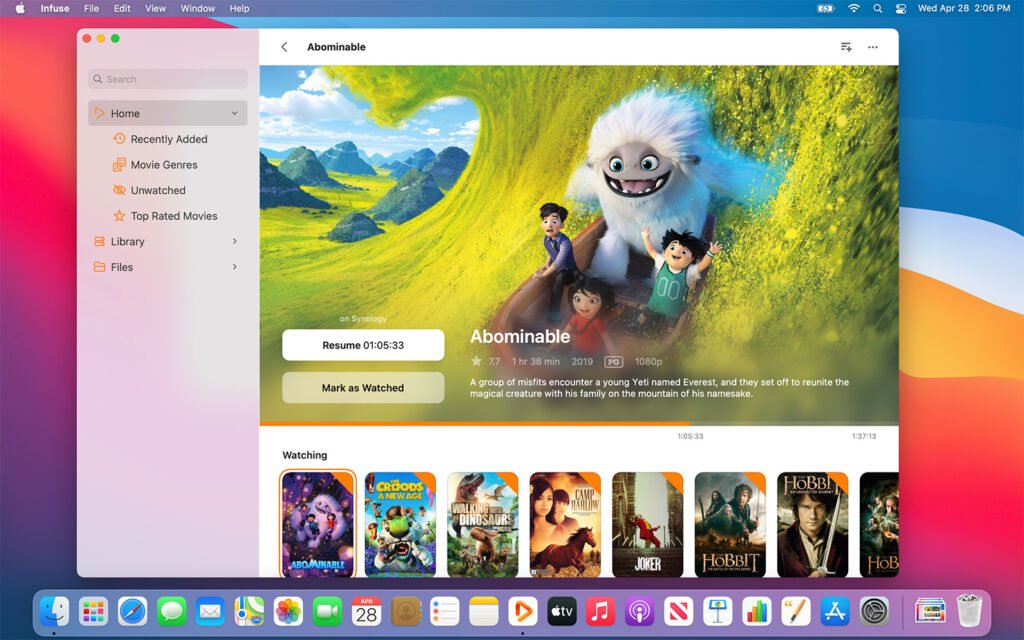
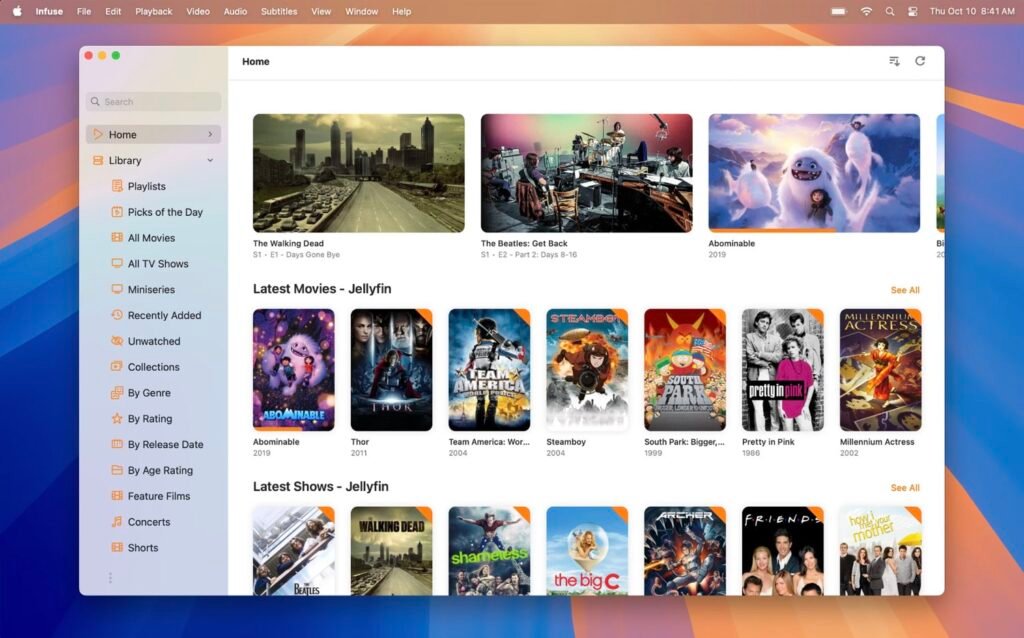
Infuse Pro offers a clean, modern, and intuitive interface that enhances the viewing experience. The application automatically retrieves metadata such as:
- Movie posters
- Synopses
- Cast information
- Ratings
This creates a Netflix-like browsing experience for your personal media library.
High-Quality Playback:
The software is optimized for macOS hardware, ensuring smooth playback even for high-resolution content. Features include:
- 4K video support
- HDR and Dolby Vision playback
- High-definition audio support (DTS-HD, Dolby TrueHD)
As a result, users can enjoy cinematic-quality images and sound directly on their Mac.
Streaming and Cloud Integration:
Infuse Pro 8.4.1 allows users to stream content from multiple sources, including:
- Network drives (SMB, NFS)
- FTP and SFTP servers
- Cloud services such as Google Drive, Dropbox, and OneDrive
This eliminates the need to store all media locally, offering flexibility and convenience.
Automatic Metadata and Subtitles:
Infuse Pro automatically downloads metadata and subtitles, saving users time and effort. It supports multiple subtitle formats and allows customization of:
- Font size
- Color
- Position
It also supports real-time subtitle downloads from online sources.
Cross-Device Synchronization:
With Infuse Pro, users can sync their library across multiple Apple devices, including:
- macOS
- iPhone
- iPad
- Apple TV
This ensures a seamless viewing experience across all platforms.
AirPlay and Chromecast Compatibility:
Infuse Pro supports wireless streaming via AirPlay and Chromecast, allowing users to:
- Mirror their screen to smart TVs
- Play videos wirelessly
- Easily share media with others
Offline Playback:
Users can download content for offline viewing, ideal for travel or situations with limited internet access.
What’s New in Infuse Pro 8.4.1:
The latest version, Infuse Pro 8.4.1, includes several improvements and bug fixes designed to optimize performance and usability.
Performance Improvements:
- Faster media scanning and indexing
- Improved playback stability for large files
- Optimized memory usage for macOS systems
- Enhanced streaming capabilities
- Better support for network streaming protocols
- Reduced buffering during playback
- Greater support for cloud services
- User Interface Updates
- Minor interface tweaks for smoother navigation
- Improved dark mode experience
- Enhanced metadata display for TV shows and movies
- Bug Fixes
- Subtitle sync issues resolved
- Playback crashes fixed in certain formats
- Improved audio sync for high-definition tracks
These updates ensure a more stable and enjoyable user experience.
you can also Download: BeLight Art Text 4.5.8 for MacOS
Screeshots:
System Requirements:
Before installing Infuse Pro 8.4.1 on your Mac, it’s important to ensure your system meets the necessary requirements.
Minimum Requirements:
- Operating System: macOS 12.0 (Monterey) or later
- Processor: Intel Core i3 or Apple Silicon (M1 or higher)
- RAM: 4 GB
- Storage: 200 MB of free disk space
Internet connection required for streaming and metadata
Recommended Requirements:
- Operating System: macOS 13.0 (Ventura) or later
- Processor: Intel Core i5/i7 or Apple M1/M2/M3
- RAM: 8 GB or more
- Storage: SSD with at least 500 MB of free space
High-speed internet connection required for smooth streaming
Meeting the recommended requirements ensures optimal performance, especially for 4K and HDR content.
Advantages and Disadvantages:
Advantages:
- Compatible with a wide range of video and audio formats
- No additional codecs required
- Attractive and user-friendly interface
- Excellent integration with streaming and the cloud
- High-quality playback with HDR and Dolby support
- Automatic metadata and subtitle retrieval
- Syncs across devices within the Apple ecosystem
Disadvantages:
- Premium features require a Pro subscription
- Limited customization compared to some advanced players
- Best experience only within the Apple ecosystem
- Large libraries may take time to index initially
Conclusion:
Infuse Pro 8.4.1 for macOS is a powerful and versatile media player designed to deliver a superior viewing experience. With its broad format support, elegant interface, and advanced playback capabilities, it satisfies both casual users and multimedia enthusiasts.
Homepage: https://mactorrent.info/