SoundSource 6.0.3 for MacOS Download

SoundSource 6.0.3 for MacOS is a powerful audio control utility designed to give users complete control over their Mac’s sound input and output. With the release of version 6.0.3, SoundSource continues to solidify its reputation as one of the most flexible and intuitive audio management tools available for macOS. Developed for both casual users and audio enthusiasts, SoundSource allows you to control volume, apply audio effects, and manage sound on a per-application basis.
macOS offers basic audio controls by default, but many users quickly find them limiting. Adjusting the volume of individual applications, instantly switching audio devices, or applying equalizer settings to the entire system isn’t a native and practical option. SoundSource fills this gap by extending macOS’s audio capabilities with precision, flexibility, and ease of use.
Key Features of SoundSource for macOS
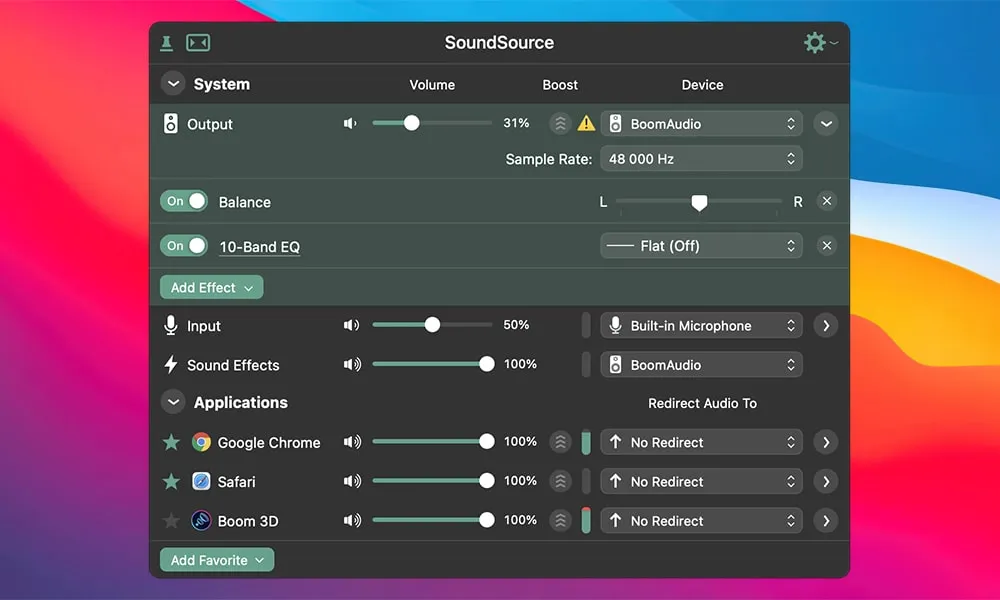
One of SoundSource’s most popular features is per-application volume control. Instead of adjusting the volume for the entire system, users can control the audio level of each application. For example, they can lower the volume of background music in a browser while maintaining a loud and clear video call or media player.
Per-Application Audio Control
- SoundSource offers a centralized audio control panel, accessible from the macOS menu bar. From this single interface, users can manage all audio input and output devices, adjust system volume, and apply sound effects without having to open multiple system settings.
Built-in Equalizer and Audio Effects
- SoundSource includes a powerful equalizer and audio effects engine. Users can adjust the sound with presets or create custom equalization profiles to suit their preferences. Effects can be applied globally or per application, making it easy to optimize audio for music, movies, games, or voice calls.
Audio Device Management
- Switching between headphones, speakers, external audio interfaces, or Bluetooth devices is a breeze with SoundSource. The application lets you instantly switch between input and output devices, saving you time and minimizing interruptions during work or entertainment.
Volume Overload
- SoundSource includes a volume overload feature that allows users to boost audio volume beyond the standard macOS limits. This is especially useful for low-volume recordings or quiet system sounds. Safety measures are included to help prevent accidental hearing damage.
Menu Bar Convenience
- SoundSource integrates seamlessly into the macOS menu bar, providing quick access to all audio controls. This design ensures that essential sound settings are always just a click away, improving workflow efficiency.
Keyboard Shortcuts and Automation
- For advanced users, SoundSource supports keyboard shortcuts and automation through macOS tools. This allows for faster control of audio settings and integration into custom workflows.
What’s New in SoundSource 6.0.3
The 6.0.3 update focuses on stability, compatibility, and improvements that enhance the overall user experience. While the interface remains familiar, several significant improvements enhance reliability and performance.
Improved Compatibility with the Latest macOS Versions
- SoundSource 6.0.3 includes updates to ensure smooth operation on the latest macOS versions. Changes to system audio frameworks are handled more effectively, reducing the risk of crashes or unexpected behavior.
Enhanced Apple Silicon Optimization
- This version further improves performance on Macs with Apple Silicon. Audio processing is more efficient, resulting in lower CPU usage and smoother operation, even with multiple effects active simultaneously.
Bug Fixes and Stability Improvements
- Several minor bugs related to device switching, audio effect persistence, and app-specific volume management have been fixed. These fixes make SoundSource more reliable during long sessions and frequent device changes.
Improved UI Behavior
- Small UI improvements enhance responsiveness and usability. Volume sliders, device lists, and effects controls behave more consistently, contributing to a smoother overall experience.
you can also Download: Bartender 6.3.1 for Mac
Screenshots:

System Requirements for SoundSource on macOS
Minimum Requirements
To install and run SoundSource for macOS, your system must meet the following minimum requirements:
- Operating System: macOS 12 (Monterey) or later
- Processor: Mac with Intel or Apple Silicon (M1 or later)
- RAM: 4 GB
- Storage: At least 100 MB of free disk space
- Audio Hardware: Standard audio devices compatible with macOS
Recommended Requirements
For the best performance and a smooth experience, the following specifications are recommended:
- Operating System: Latest version of macOS
- Processor: Apple Silicon (M1, M2, or later)
- RAM: 8 GB or more
- Storage: SSD for optimal system responsiveness
- Audio Hardware: High-quality external audio devices or headphones
Advantages and Disadvantages of SoundSource for macOS
Advantages
- Precise volume control per application
- Equalizer and audio effects Integrated features
- Fast audio switching from the menu bar
- Optimized for Apple Silicon and modern macOS
- Clean, intuitive, and professional interface
- Useful for both casual users and audio professionals
Disadvantages
- Requires a paid license for full functionality
- Advanced features may be unnecessary for basic users
- Initial setup may request additional system permissions
- Not designed as a complete digital audio workstation
Conclusion
SoundSource for macOS version 6.0.3 is an exceptionally powerful audio management tool that significantly expands the possibilities for users with sound on their Mac. By offering per-application volume control, advanced audio effects, smooth device switching, and a convenient menu bar interface, it complements the default macOS audio features.
The latest updates improve stability, performance, and compatibility, especially on Macs with Apple Silicon, ensuring that SoundSource remains a modern and reliable solution. While not designed to replace professional audio production software, it excels as a system-wide audio enhancement and control utility.
In conclusion, if you want greater control over your Mac’s audio, improved sound customization, and a more efficient way to manage multiple audio sources, SoundSource for Mac is a powerful and valuable addition to your macOS toolkit.
Homepage: https://mactorrent.info
Leave a Reply