Path Finder 11.0 for MacOS Download

Path Finder for macOS is a powerful, feature-rich file management application designed as an advanced alternative to the default Finder. Designed for users seeking greater control, flexibility, and productivity, Path Finder transforms file and folder management on your Mac. It combines a familiar macOS-style interface with professional tools, making it ideal for beginners, advanced users, developers, and creative professionals alike.
Path Finder version 11.0 marks a significant milestone, delivering performance improvements, deeper macOS integration, and enhanced usability. With dual-pane navigation, advanced file operations, customizable workflows, and integrated tools, Path Finder 11.0 aims to streamline everyday file management tasks while simplifying complex operations.
Key Features of Path Finder for macOS
Dual-Pane File Browsing
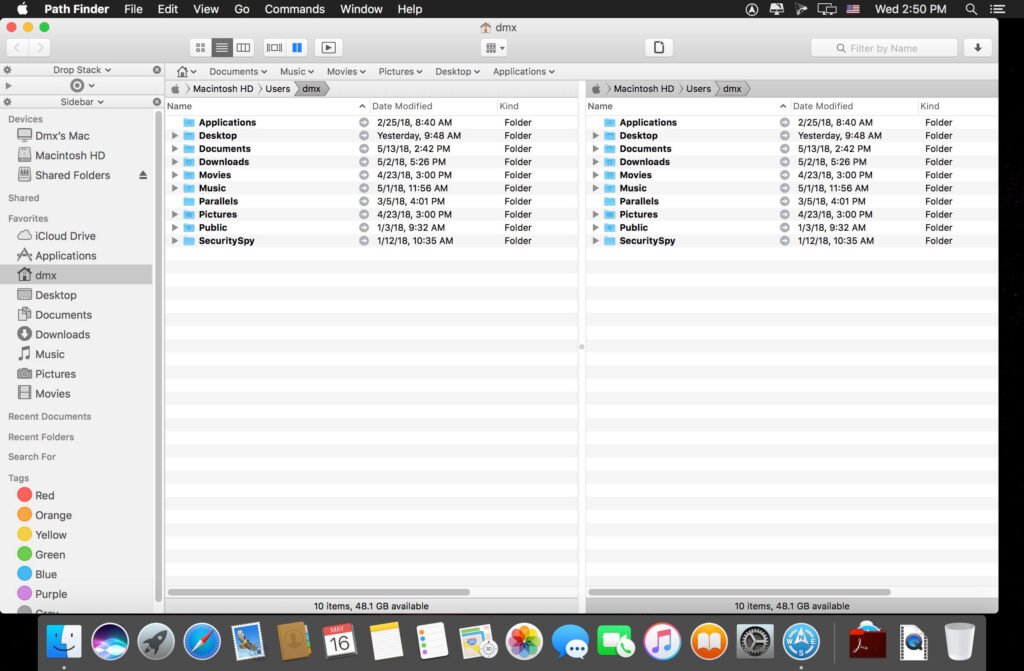
- One of Path Finder’s most popular features is its dual-pane interface. This allows users to view and manage two folders simultaneously, significantly speeding up file transfers, comparisons, and organization. As a result, tasks like copying, moving, or syncing files are more efficient than with the standard Finder.
Advanced File Operations
- Path Finder goes far beyond copying and pasting. It supports queued file operations, pausing and resuming transfers, batch renaming, and advanced search filters. These tools are especially useful for users who frequently manage large volumes of files.
Built-in Terminal and Tools
- To improve workflow efficiency, Path Finder includes a built-in terminal, a file permissions editor, and a hex editor. This means users can perform advanced operations without switching between multiple applications. Consequently, developers and system administrators greatly benefit from this all-in-one approach.
Folder Synchronization and Comparison
- Path Finder 11.0 allows users to synchronize folders or accurately compare their contents. This feature is ideal for backups, project version control, and ensuring consistency across directories. Differences are clearly highlighted, making it easy to identify missing or outdated files.
Customizable Interface
- Customization is one of the key advantages of Path Finder for macOS. Users can personalize the interface by adding modules such as file previews, metadata panels, and activity logs. Toolbars, keyboard shortcuts, and layouts can also be customized to suit individual workflows.
File Tagging and Labeling
- With support for tags and color coding, Path Finder helps users organize files visually. This feature improves productivity by making it easier to quickly locate important documents.
Cloud and Network Support
- Path Finder integrates seamlessly with cloud storage services and network drives. Whether accessing local files, remote servers, or external storage, users can manage everything from a single interface.
What’s New in Path Finder for macOS 11.0
Version 11.0 introduces significant improvements that optimize both performance and usability, making it one of the most refined versions to date.
Improved Performance and Stability
- Path Finder 11.0 has been optimized for faster startup times and smoother file operations. Memory usage has been optimized, ensuring better performance even when managing large directories or complex tasks.
Enhanced macOS Compatibility
- This version offers improved compatibility with the latest macOS versions, including better support for Apple Silicon. As a result, users of newer Macs can expect a more responsive, native experience.
Refined User Interface
- The Path Finder 11.0 interface has been subtly refined to better align with modern macOS design standards. Improved icons, cleaner designs, and smoother animations contribute to a more intuitive user experience.
Enhanced File Previews and Metadata Management
- File previews have been improved, allowing users to view documents, images, and multimedia files more quickly. Metadata management has also been improved, making it easier to inspect file details without opening additional windows.
Bug Fixes and Workflow Improvements
- Numerous bug fixes and workflow improvements have been implemented based on user feedback. These updates ensure a more reliable and consistent experience for everyday use.
you can also Download: EPUB Reader Pro 3.0.2 for Mac
Screenshots:

System Requirements for Path Finder for macOS
Before installing Path Finder for macOS 11.0, it is important to verify that your system meets the required specifications.
Minimum Requirements
- Operating System: macOS 10.14 or later
- Processor: Mac with an Intel or Apple Silicon processor
- RAM: 4 GB
- Storage: Approximately 300 MB of free disk space
- Internet Connection: Required for updates and licenses
Recommended Requirements
- Operating System: Latest version of macOS
- Processor: Apple Silicon or modern Intel processor
- RAM: 8 GB or more
- Storage: 500 MB of free disk space
- Internet Connection: Stable broadband connection
Meeting the recommended requirements ensures optimal performance, especially for users who rely heavily on advanced features.
Advantages and Disadvantages of Path Finder for macOS
Advantages
- Powerful alternative to the default Finder
- Dual-pane navigation for faster file management
- Advanced file operations and folder synchronization
- Highly customizable interface and workflows
- Built-in tools such as Terminal and file comparison
- Excellent performance on Macs with Intel and Apple Silicon processors
Disadvantages
- Learning curve for users new to advanced file managers
- More features than casual users might need
- Requires a paid license to access all features
Conclusion
Path Finder for macOS 11.0 is a comprehensive file management solution that significantly improves productivity and control compared to the default Finder. Its extensive feature set, customizable interface, and advanced tools make it an excellent choice for professionals, power users, and anyone who regularly works with large or complex file systems.
While it may take some time to fully explore its capabilities, the efficiency improvements and flexibility offered by Path Finder make it a worthwhile investment. With enhanced performance, compatibility with modern macOS, and ongoing development, Path Finder 11.0 remains one of the most powerful file manager alternatives available for Mac users.
Homepage: https://mactorrent.info
Leave a Reply