DaisyDisk 4.33.3 (4.33.3) for MacOS Download

DaisyDisk for MacOS offers a visual and intuitive way to analyze disk usage and reclaim valuable storage space.
Unlike built-in storage management tools, DaisyDisk provides an interactive graphical interface that makes it easy to locate large files and hidden data that are consuming disk space. Whether you’re a casual user, student, creative professional, or business user, DaisyDisk for Mac helps you maintain optimal system performance with minimal effort.
Version 4.33.3 offers increased stability, improved compatibility with modern macOS versions, and enhanced performance optimization. In this detailed guide, we’ll explore DaisyDisk for MacO features, updates, system requirements, advantages, and disadvantages, and why it remains one of the best disk space analysis tools for macOS.
Key Features of DaisyDisk for macOS
DaisyDisk stands out among disk cleaning applications for Mac thanks to its intelligent visualization system and efficient file management tools. Below are the key features that define its performance.
Interactive Disk Space Visualization
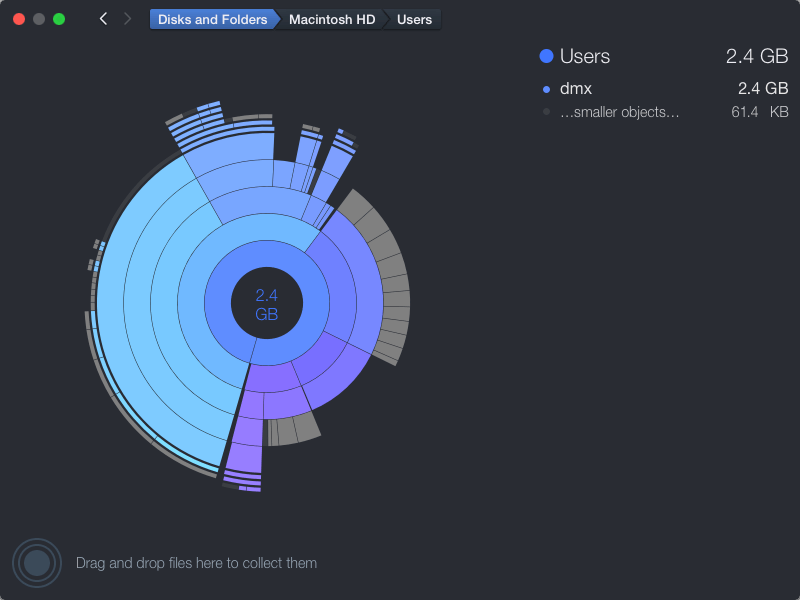
- One of DaisyDisk’s most prominent features is its interactive sunburst map. This circular visual representation displays files and folders in proportion to the space they occupy. Larger segments indicate larger files, allowing users to quickly identify space-consuming items.
- Instead of navigating through endless lists of folders, users can click directly on the segments to visually explore the contents. As a result, finding space-consuming files is much easier.
Fast Disk Scanning Engine
- DaisyDisk uses a high-speed scanning engine that analyzes the disk in seconds. Whether scanning an internal SSD or an external drive, the software provides near-instant results.
- Thanks to this optimized performance, users don’t have to wait long to see detailed disk usage data. This feature is especially useful when managing large storage volumes.
Safe and Intelligent File Deletion
- Manually deleting files can be risky if you’re unsure of your purpose. DaisyDisk includes a safe deletion system that allows users to preview files before deleting them. Files are first moved to a collection area, allowing users to review their selections before permanently deleting them.
- This ensures that critical system files are not accidentally deleted.
External Drive Compatibility
DaisyDisk isn’t limited to internal storage. It supports:
- External hard drives
- USB flash drives
- Thunderbolt drives
- Network storage
Therefore, users can manage storage across multiple devices from a single interface.
Hidden File Detection
Many disk cleaning tools fail to show hidden system files. However, DaisyDisk reveals hidden space usage, such as:
- System caches
- Application remnants
- Temporary files
- Large hidden folders
As a result, users gain complete transparency about their Mac’s storage.
Real-time file monitoring
- DaisyDisk dynamically updates storage information. If files are added or deleted during a scan, the application instantly reflects these changes.
This feature ensures accurate data representation at all times.
Lightweight and optimized for macOS
- DaisyDisk is specifically optimized for macOS, delivering a smooth and responsive experience. It integrates seamlessly with macOS design standards and supports modern features such as Retina display resolution and Apple Silicon performance enhancements.
What’s new in DaisyDisk 4.33.3
Version 4.33.3 focuses on stability, compatibility, and performance improvements.
Improved macOS Compatibility
- This update improves compatibility with the latest macOS versions, ensuring smooth operation on modern systems, including macOS Ventura and later.
Enhanced Performance with Apple Silicon
- DaisyDisk 4.33.3 delivers improved performance on Macs with Apple Silicon, including M1, M2, and later chips. Scanning speed and system responsiveness have been further optimized. Stability Improvements
- Several minor bugs from previous versions have been fixed. Users now experience fewer crashes and greater reliability during extended scanning sessions.
User Interface Improvements
- Subtle user interface tweaks improve clarity and ease of navigation. While the basic design remains familiar, small improvements streamline workflow.
you can also Download: Aiarty Video Enhancer 3.5 for MacOS
Screenshots:

System Requirements
Before installing DaisyDisk for macOS 4.33.3, please verify that your system meets the requirements.
Minimum Requirements
- MacOS 10.13 High Sierra or later
- Mac with Intel or Apple Silicon
- 100 MB of available disk space
- 2 GB of RAM
Recommended Requirements
- MacOS 12 Monterey or later
- Apple Silicon (M1, M2, or later)
- 8 GB of RAM or more
- SSD storage for faster scanning
Although DaisyDisk is lightweight, meeting the recommended specifications ensures optimal scanning speed and responsiveness.
Advantages and Disadvantages of DaisyDisk for macOS
Advantages
- Clear Visual Representation
- The sunburst map makes it easy to identify large files.
- Fast Scanning Performance
- Fast disk scanning saves time.
- Secure File Deletion System
- The preview before deletion reduces risk.
- External Drive Compatibility
- Easily manage multiple storage devices.
- Lightweight and Efficient
- Minimal system resource consumption.
- Optimized for Apple Silicon
- Improved performance on modern Macs.
Disadvantages
- Paid Software
- DaisyDisk requires purchase after the trial period.
- No Automatic Cleanup Mode
- Requires manual file selection.
- Limited Advanced Automation
- Lacks comprehensive automated cleanup rules compared to competitors.
Despite these minor drawbacks, DaisyDisk remains a highly reliable and efficient disk space analyzer for macOS users.
Conclusion
DaisyDisk for macOS 4.33.3 is a powerful and intuitive disk space analyzer that simplifies storage management on Mac computers. Its interactive visual interface, fast analysis engine, and secure deletion process make it an excellent choice for those who want complete control over their storage.
Furthermore, the latest version improves performance on Macs with Apple Silicon and ensures compatibility with modern macOS versions. While it doesn’t offer automated cleanup features, its visual approach allows users to make informed decisions about file deletion. In short, if you’re looking for a reliable disk cleaner and storage analyzer for Mac that combines speed, clarity, and security, DaisyDisk 4.33.3 is a smart and effective solution for maintaining optimal system performance.
Homepage: https://mactorrent.info/
Leave a Reply